

The landscape of artificial intelligence is undergoing a quiet yet profound decentralization. Open-weight AI models now trail the absolute best closed-source models by an average of only about four months, and a rapidly expanding number of these powerful systems can run entirely on consumer hardware that many users already own.
For years, accessing state-of-the-art conversational AI meant paying a monthly subscription fee of around $20 and blindly trusting corporate servers with sensitive prompts and personal data. That dynamic is shifting. Today, users who want to avoid recurring subscription costs, protect their privacy from third-party data harvesting, or experiment with customizable software can download and run advanced AI models directly on their personal computers using free, accessible tools.
Why Run an AI Model Locally?
The primary driver behind the local AI movement is privacy. When interacting with standard cloud-based chatbots, every prompt, uploaded document, and conversational thread is transmitted directly to a company’s centralized servers. The privacy implications of this data pipeline have grown increasingly stark; legal challenges have forced major AI providers to preserve conversation logs, including data users thought they had deleted.
In contrast, running an open-weight model locally keeps the entire conversation securely contained within the user’s personal machine. Applications designed for local deployment, such as LM Studio, can operate entirely offline once the necessary model files are downloaded, ensuring that even attached documents and sensitive inputs never leave the physical device.
Beyond privacy and the elimination of monthly subscription fees, local execution offers unprecedented freedom through open-source licensing. Models released under permissive open-source frameworks—such as DeepSeek’s R1 series, which is governed by the MIT License, or Google’s Gemma 4 and OpenAI’s gpt-oss models, which ship under Apache 2.0—grant users the legal right to use, modify, and build derivative works.

This level of customizability opens the door to specialized applications. While a general-purpose cloud model is designed to satisfy a broad audience, a locally hosted model can be fine-tuned or selected for specific domains, such as medical research or niche programming languages, tailoring its capabilities precisely to the user’s unique professional or personal requirements.
What Your Hardware Can Actually Run
Understanding whether your computer is capable of running a local AI model comes down to hardware specifications, specifically memory allocation. AI models are measured in parameters, which are the internal numerical values adjusted during the training process. The file size of a downloaded model scales directly with its parameter count.
To run these models effectively, the system must have adequate video memory, known as VRAM, on a dedicated graphics card, or shared unified memory on architectures like Apple Silicon Macs. As a baseline, systems equipped with at least 8GB of VRAM can handle smaller, compressed models. However, advanced users seeking higher performance often rely on dedicated gaming GPUs featuring 24GB or more of VRAM, multi-GPU stacking rigs, specialized AI hardware racks, or unified memory systems like the Mac Mini or the Nvidia DGX Spark.
To bridge the gap between massive models and consumer hardware, developers rely on a process called quantization. Quantization shrinks the overall size of a model by storing its weights and activations using low-precision data types—such as 8-bit integers instead of standard 32-bit floating points. While this drastically reduces memory consumption and allows large models to fit on modest hardware, it introduces a minor trade-off in overall accuracy.
System requirements vary depending on the chosen platform and software. For Apple Silicon Macs running modern versions of macOS, application documentation generally recommends 16GB or more of unified memory, though 8GB models can still manage smaller variants. On Windows systems, platforms typically recommend at least 16GB of system RAM alongside 4GB of dedicated VRAM and processor support for AVX2 instructions, while older Intel-based Mac architectures remain largely unsupported.
Model sizing illustrates the diversity of options available. Google’s Gemma 4 library features variants like the 26B model requiring between 16GB and 19GB of memory, and the 31B version demanding up to 20GB. Meanwhile, OpenAI’s gpt-oss-20b operates comfortably within 16GB of memory, whereas its larger gpt-oss-120b counterpart requires up to 80GB of memory capacity.
Setting Up Ollama and LM Studio
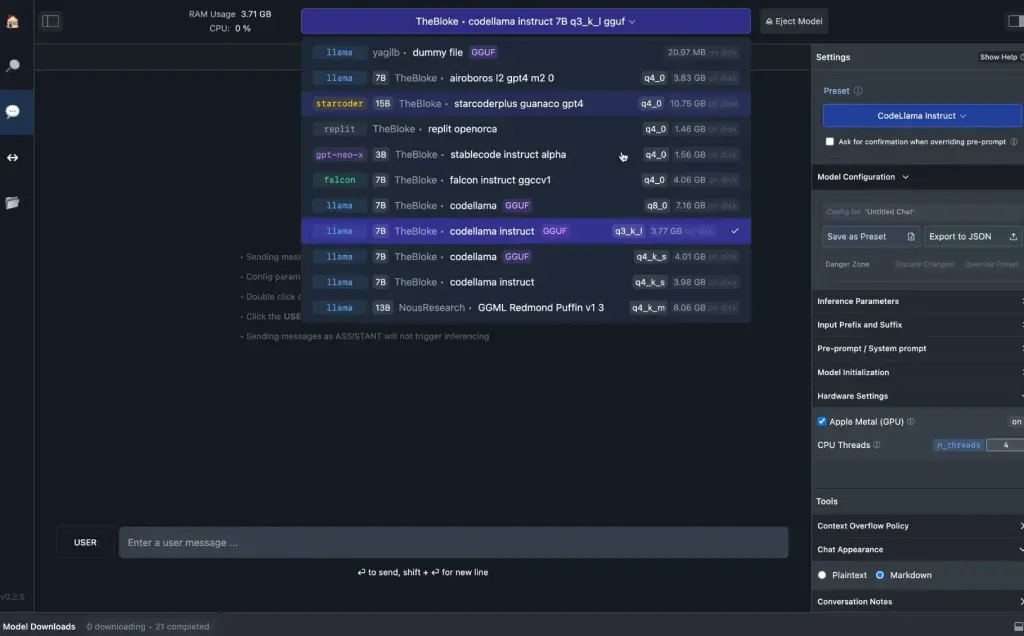
Deploying a local AI assistant has become remarkably straightforward, largely due to user-friendly client applications like LM Studio and Ollama. LM Studio provides a polished, intuitive graphical user interface that appeals to mainstream users, functioning as an all-in-one hub where individuals can search public repositories like Hugging Face, download model weights, and launch a chat interface.
Ollama, conversely, caters primarily to developers and power users who prefer interacting through command-line interfaces. Installation on macOS and Linux systems utilizes simple terminal shell scripts, while Windows users execute commands through PowerShell. Once installed, commands allow users to instantly pull and execute specific models, while simultaneously opening a local API endpoint on the machine. This local API allows other software applications on the same computer to leverage the running AI model seamlessly.
While most open-weight models run entirely offline, some platforms offer cloud-integrated options denoted by specific suffixes. Users prioritizing absolute privacy typically bypass these cloud-based variants in favor of fully local downloads. However, these cloud options serve as a useful secondary tier for individuals who require heavier computational lifting without sacrificing data governance, as prompts handled via these specific APIs are generally prohibited from being stored on provider servers or used for model training.
Performance enhancements continue to emerge for local environments. Implementations like Google’s Multi-Token Prediction drafters for Gemma 4 utilize speculative decoding to accelerate text generation by up to three times without requiring new hardware upgrades. This technique involves a smaller companion model proposing several tokens ahead of time, which the larger primary model then verifies in a single unified pass. Furthermore, local frameworks increasingly support advanced features like web search and local file retrieval through Model Context Protocol (MCP) servers, narrowing the functional gap between local tools and cloud-hosted assistants.
Where Local Models Still Trail the Cloud
Despite the rapid narrowing of the performance gap—with top open-weight models now trailing proprietary frontier systems by just four months on average—significant limitations remain. The most advanced open models feature staggering parameter counts that far exceed the physical capabilities of standard consumer hardware. For comparison, massive architectures like Alibaba’s Qwen3.8-Max boast over 2.4 trillion total parameters with tens of billions active at any given time, dwarfing the hardware requirements of even high-end local setups.
When a model’s requirements exceed the available VRAM and spill over into standard system RAM, response generation speeds can drop significantly. Additionally, managing larger context windows—the amount of reference text a model can analyze simultaneously—demands substantially more memory resources. While smaller Gemma variants comfortably handle 128K-token context windows, their larger counterparts scale up to 256K tokens, pushing hardware limits further.
Cloud-based services bypass these local hardware constraints entirely, maintaining a distinct advantage on the most complex reasoning tasks and benchmarks. Even so, for day-to-day writing, coding assistance, and private data analysis, the maturation of open-weight models running on local hardware provides a viable, cost-effective, and deeply private alternative to traditional subscription-based AI services.
 Web3 & Decentralized Web
 Web3 & Decentralized Web
 Web3 & Decentralized Web